Test Driving GitHub's Spec Kit: Requirements Quality Matters
Bad requirements produce bad code—this was true with humans and is exponentially worse with AI. Vague prompts force AI to guess at thousands of unstated constraints, generating code that looks right but fails under real-world conditions. GitHub Spec Kit addresses this through structured phases: Constitution guardrails, mandatory clarification loops, discrete pipeline gates, and human verification. Requirements quality matters more than coding speed.
Part One: The Discovery
This is the first article in a four-part series exploring Spec-Driven Development:
- Test Driving GitHub's Spec Kit (this article) - Discovering the methodology
- Extending Spec Kit for Constitution-Based PR Reviews - Adding PR review capabilities
- Why I Forked GitHub Spec Kit - Building Spec Kit Spark
- Taking Spec-Kit Spark to the Next Level - The Adaptive SDLC Toolkit
Garbage in, garbage out. This principle has haunted software development since the first line of code was written. Vague requirements produce broken software—whether a human or an AI is doing the coding.
GitHub Spec Kit addresses this by enforcing requirements quality before code generation. It's a structured framework that forces precision: clarify intent, capture constraints, decompose complexity, then generate code.
But here's what makes this series different from a typical tool review: I discovered that Spec Kit's core concept—the project constitution—has value far beyond new feature development. Throughout this series, I'll show how constitution-driven governance can:
- Analyze existing codebases to discover hidden patterns and quantify technical debt (critical for brownfield projects)
- Power automated PR reviews that enforce standards consistently
- Adapt documentation throughout the development lifecycle
Whether you're starting fresh or maintaining millions of lines of legacy code, the discipline of specification-driven development applies. This first article covers the foundation; subsequent parts build toward a complete governance framework.
Who This Is For
Solutions architects translating business requirements into technology, development teams seeking escape from the prompt-generate-debug cycle, engineering leaders building institutional knowledge that scales beyond individual contributors, and teams maintaining existing codebases who need to understand and govern what they already have.
References
- GitHub Spec Kit: https://github.com/github/spec-kit
- GitHub Copilot: https://github.com/features/copilot
- WebSpark.HttpClientUtility Repository: .NET NuGet package example
- GitHub Stats Spark Repository: Complete SpecKit + Claude + Copilot workflow
- GitHub Actions: https://docs.github.com/actions
- NuGet Publishing: https://learn.microsoft.com/nuget/create-packages/publish-a-package
The Requirements Quality Problem
Bad requirements produce bad code. This was true when humans wrote all the code, and it's exponentially worse with AI assistance.
AI Amplifies the Problem
When you tell an AI "create a reporting dashboard," it has to guess:
- What data sources?
- What queries?
- What visualization types?
- What filters and interactions?
- What performance requirements?
- What accessibility standards?
- What security constraints?
The AI fills these gaps with learned patterns from its training data—which may be generic, outdated, or completely wrong for your context. You get code that "looks right" but fails when you try to use it.
This is the "vibe coding" problem: throwing vague prompts at an AI and iterating through generate-test-debug cycles until something works. It's inefficient for humans and wastes the AI's capabilities.
What If You Could Force Requirements Quality?
GitHub Spec Kit takes a different approach: don't generate code until requirements are precise.
The framework enforces quality through structure:
- Constitution: Non-negotiable architectural principles and constraints
- Clarification loops: AI asks questions to expose gaps before planning
- Phased pipeline: Separate "what" (spec) from "how" (plan) from "do" (implement)
- Human verification gates: Review and validate before proceeding to next phase
- Executable artifacts: Specifications become source of truth for code generation
I tested this on a production NuGet package. Two distinct features across an existing codebase. The discipline of writing precise specifications changed how I thought about requirements—and the code quality reflected it.
What Is Spec Kit?
GitHub Spec Kit is a framework that enforces requirements quality through structure. Instead of letting you jump from vague idea to code generation, it creates a disciplined pipeline:
SPEC.md → PLAN.md → TASKS.md → Implementation
You use slash commands in Copilot (speckit.specify,speckit.plan, ***speckit.tasks,speckit.implement) to generate these artifacts. But the real value isn't the markdown files—it's the quality gates between each phase.
Five Mechanisms That Prevent "Garbage In"
1. Constitution as Guardrail
Before you write any specs, you define a Constitution: non-negotiable architectural principles, technology constraints, quality standards, and team conventions. This prevents the AI from generating "generic best practices" that violate your specific requirements.
Example: "All public APIs must have XML documentation. No #pragma suppressions allowed. Tests are product documentation."
2. Mandatory Clarification Loops
The speckit.clarify command forces the AI to analyze your spec for ambiguities and ask targeted questions before planning begins. This exposes the gaps you didn't know you had.
Example questions AI might ask:
- "What should happen when the API rate limit is exceeded?"
- "Should the system handle timezone conversions or store everything in UTC?"
- "What's the acceptable performance threshold for report generation?"
3. Discrete, Phased Pipeline
Each phase has a specific responsibility:
- /specify: Captures the "what" and "why" (user stories, success criteria, edge cases)
- /plan: Translates requirements into technical architecture (modules, dependencies, technology choices)
- /tasks: Decomposes plan into small, reviewable work units
- /implement: Generates code only after the previous artifacts are validated
This prevents errors in one phase from cascading into the next. If your spec is vague, the plan will expose it. If your plan is incomplete, the tasks will reveal gaps.
4. Human-in-the-Loop Verification
You review and approve each artifact before proceeding. This isn't just "looks good to me"—you're asking:
- Does this spec capture the actual business requirements?
- Does this plan account for our legacy constraints?
- Are these tasks specific enough to implement?
The human acts as orchestrator and quality filter, not just a code reviewer at the end.
5. Specifications as Single Source of Truth
Instead of treating specs as write-once documentation, Spec Kit makes them living artifacts. When implementation reveals new constraints or better approaches, you update the specs to reflect reality. Future work inherits these lessons.
This creates a feedback loop: implementation improves specs → improved specs produce better code → better code reveals more insights.
The pitch: By forcing requirements precision before code generation, you get better code from both AI and humans. That's the theory. I tested it on real projects to see if the discipline is worth the overhead.
My Experiment: Testing Requirements Quality
I picked WebSpark.HttpClientUtility, a production .NET NuGet package I maintain. Two features I'd been postponing: a documentation website and cleaning up compiler warnings. Perfect test cases for comparing vague vs. precise requirements.
Spec 001: Build a documentation site.
Initial (vague) requirement: "Create a documentation website for the NuGet package."
What the AI guessed wrong: AI generated an Elevently-based static site with absolute path configuration (standard pattern from its training data). Broke immediately on GitHub Pages because subdirectory deployment requires relative paths.
Required clarification: Where will this be deployed? What path structure? What's the base URL? How should navigation work across environments?
Updated requirement: "Eleventy site deployed to GitHub Pages at WebSpark.HttpClientUtility. All paths must be relative, calculated dynamically. No environment-specific configuration in templates."
Result: Custom relativePath filter that works correctly. But more importantly, this path resolution requirement is now captured in SPEC.md so future features inherit it.
Spec 002: Zero compiler warnings.
Initial (vague) requirement: "Fix compiler warnings."
What the AI tried first:
#pragma warning disableWhat I rejected: Suppressions hide problems instead of fixing them.
Required clarification: What's acceptable? What's the quality standard? Do tests need documentation?
Updated requirement: "Zero warnings with TreatWarningsAsErrors enabled. Fix properly with XML documentation and null guards. No pragma suppressions except analyzer-specific cases with justification. Test methods need documentation explaining WHAT and WHY."
Result: The AI generated proper fixes once the quality standard was explicit. More importantly—this remediation strategy is now captured in PLAN.md and encoded in CONSTITUTION.md.
Those experiments taught me something fundamental: The problem wasn't the AI's coding ability. The problem was my vague requirements. When I forced myself to be precise about constraints, edge cases, and quality standards, the AI generated better code.
Deep Dive: Creating GitHub Stats Spark
Stats Spark started as a deceptively simple idea—"illuminate my GitHub profile with automated SVG stats"—and grew into a rigorously planned system that blends GitHub SpecKit, Claude-powered planning, and GitHub Copilot-assisted iteration. Here's how a Sunday morning thought experiment became a production-ready automation pipeline.
The Starting Point: A Simple Idea
I wanted automated SVG badges for my GitHub profile showing activity stats, contribution patterns, and a custom "Spark Score" that reflected consistency, volume, and collaboration. The goal wasn't just pretty graphics—I wanted a system that could regenerate stats daily and capture my development patterns over time.
Instead of jumping into code, I started with SpecKit. That decision shaped everything that followed.
Phase 1: Spec-First North Star
The Foundation: SPEC.md
The spec captured everything: 6 user stories, 28 functional requirements (FR-001 through FR-028), measurable success criteria, and edge cases. Most importantly, it codified the Spark Score formula itself:
SparkScore = 0.40 × C_consistency + 0.35 × C_volume + 0.25 × C_collaborationThis mathematical definition in the spec meant every downstream artifact—plan, tasks, implementation—inherited the same weighting. No ambiguity about priorities.
What the spec defined:
- Six visualizations: activity calendar, language breakdown, repository stats, contribution timeline, collaboration network, streak tracker
- Scoring algorithm with explicit coefficients for consistency (40%), volume (35%), collaboration (25%)
- Success metrics: 6 SVG files, daily refresh, < 30s generation time
- Edge cases: API rate limits, timezone handling, private repo filtering
- Quality gates: YAML config validation, GitHub Actions integration
Phase 2: Claude + SpecKit Blueprint
After the spec, I ran
/speckit.planPLAN.md: The Connective Tissue
PLAN.md bridged vision and implementation with:
- Constitution checks: Design principles that would govern all decisions
- Phase gates: Four phases (Setup, Core, Integration, Polish) with clear dependencies
- Technology bets: PyGithub for API access, svgwrite for graphics, YAML for config, GitHub Actions for automation
- Module contracts: Named every module (GitHubFetcher, StatsCalculator, StatisticsVisualizer) with input/output specifications
- Dependency graph: Explicit call-outs of what depends on what, enabling parallel development
This level of detail is what makes the difference. It's not a vague "use Python and GitHub API"—it's "here's exactly how the pieces fit together and why we chose each technology."
Phase 3: Actionable Backlog
/speckit.tasksTask Breakdown Pattern:
[US1] Daily Stats Update
├─ Task 001: Setup GitHub Actions workflow
├─ Task 002: Configure cron schedule
├─ Task 003: Implement stats fetcher
├─ Task 004: Generate SVG outputs
└─ Task 005: Commit artifacts back to repo
Quality Gates:
- YAML config passes validation
- All SVGs render without errors
- GitHub Actions workflow succeeds
- Generation completes in < 30 seconds
- Artifacts committed to correct paths
Pairing PLAN.md with TASKS.md creates the "spec before code" discipline. You can't implement what you haven't defined, and you can't define it without thinking through dependencies.
Phase 4: The Claude-to-Copilot Handoff
The git commit history tells the implementation story. It shows three distinct phases that perfectly illustrate how SpecKit, Claude, and Copilot work together:
Git History as Build Log
Phase 1: Specification Capture
- Commit 73e83d2: Specification remediation—tightened requirements, added edge cases
- Commit 76d2ead: Implemented SpecKit command suite—committed generated SPEC.md, PLAN.md, TASKS.md
Phase 2: Claude-Powered Scaffolding
- Commit ceb52c5: Core modules landed—GitHubFetcher, StatsCalculator, StatisticsVisualizer
- Commit 282b378: Logging framework with structured output
- Commit 107985e: Theme system for visual consistency
Phase 3: Copilot-Assisted Refinement
- Commit e9e55ae: Fixed SVG spacing in commit heatmap
- Commit 1328888: Adjusted fun-stat layouts for mobile
- Commit ddf2df9: Tweaked coefficient-of-variation for consistency scoring
- Commit 2e28b21: Added release-cadence visualization
The pattern is clear: Claude owns the architecture and module scaffolding (the "what" and "how"), while Copilot handles surgical refinements (the "tweak" and "polish"). Heavy lifting up front, iteration at the edges.
This is exactly what the repo documents: SpecKit/Claude for structure, Copilot to sand the edges.
Phase 5: Automation Feedback Loop
The system wasn't done until it was self-sustaining. User Story 1 required daily automated updates, which meant GitHub Actions had to regenerate SVGs and commit them back to the repo.
Closed-Loop Automation
Every manual push triggered
github-actions[bot]- Commit b927634: Bot regenerated all SVGs after manual update
- Commit 3ad76d2: Daily scheduled run at 09:00 UTC
- Commit 88ae324: Artifacts committed back to repo automatically
This proves the daily-job requirement from the spec was wired before feature development finished. The automation wasn't bolted on at the end—it was part of the architecture from PLAN.md forward.
What Made This Work: The Three-Tool Symphony
SpecKit
- Role: Capture requirements, define success
- Artifacts: SPEC.md, PLAN.md, TASKS.md
- Value: Forces precision before coding, creates institutional knowledge
Claude
- Role: Architectural scaffolding, module design
- Artifacts: Core classes, logging, themes
- Value: Handles complexity, reads specs, owns the "how"
Copilot
- Role: Iterative refinement, visual polish
- Artifacts: Layout tweaks, spacing fixes, edge cases
- Value: Rapid iteration, sands rough edges
The Result
What Got Built:
- Six SVG visualizations (activity calendar, language breakdown, repo stats, timeline, collaboration, streaks)
- Spark Score calculation with documented coefficients
- GitHub Actions workflow with daily regeneration
- YAML configuration system with validation
- Complete logging and error handling
- Theme system for visual consistency
- Automated artifact commits back to repository
Live Example: GitHub Stats Overview
Here's what the system generates automatically. This SVG updates daily via GitHub Actions, showing real-time stats from my GitHub profile:
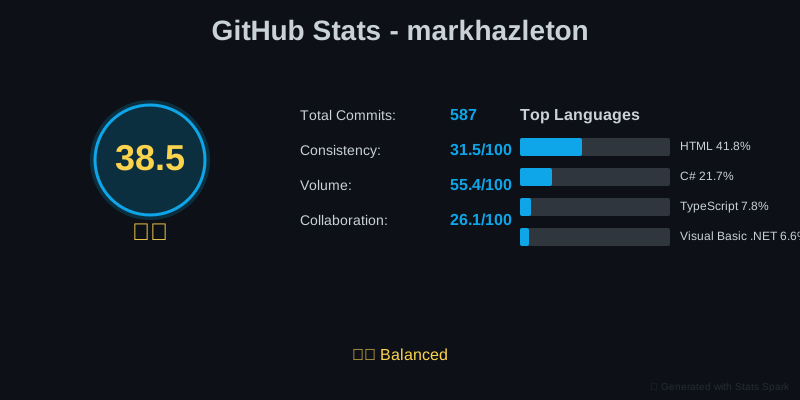
View the complete GitHub profile or explore the Stats Spark repository to see all visualizations and implementation details.
More importantly: every architectural decision, every algorithm choice, every "why we did it this way" is captured in the SpecKit artifacts. The repository documents its own creation.
The Documentation Payoff
Here's where it matters: if I need to extend Stats Spark in six months, or if someone else picks it up, the specs tell the whole story. Why those specific coefficient weights? It's in SPEC.md with the research citations. Why svgwrite instead of PIL for graphics? PLAN.md explains the decision criteria. What order should features be implemented? TASKS.md has the dependency graph.
That's institutional knowledge, not tribal knowledge. The key step is updating the specs after implementation—capturing what worked, what didn't, and why the final solution differs from the initial plan.
What I Learned: Precision Is Expensive But Worth It
The specs forced me to articulate requirements more precisely than I ever do in normal development. For the warning cleanup, I couldn't just say "fix the warnings"—I had to define:
- Starting state: X warnings currently present (audit first)
- End state: Zero warnings with TreatWarningsAsErrors enabled in .csproj
- Quality standard: No suppressions (except documented analyzer exceptions)
#pragma warning disable - Validation: 520 tests must still pass
- Scope: XML documentation for public APIs AND test methods
Three Requirements Gaps That Broke AI Generation
1. I didn't specify baseline audit
- What I wrote: "Fix all compiler warnings"
- What AI did: Started generating fixes without understanding scope
- What I should have written: "First: audit and categorize warnings. Then: prioritize XML docs, then null safety, then analyzer warnings."
- Lesson: AI needs explicit sequencing when dependencies exist.
2. I didn't define "acceptable fix"
- What I wrote: "No suppressions allowed"
- What AI did: Guessed at what constitutes a "proper" fix
- What I should have written: "✅ DO: Add XML docs with meaningful descriptions. Use ArgumentNullException.ThrowIfNull() for null guards. ❌ DON'T: Use #pragma directives. Use generic 'The parameter' docs."
- Lesson: AI can't infer your quality standards. Be explicit.
3. I didn't set implementation boundaries
- What I wrote: (nothing about timeline or checkpoints)
- What AI did: Attempted to fix all 200+ warnings in one pass
- What I should have written: "Phase 1: XML docs (2 hours). Validate. Phase 2: Null guards (1 hour). Run tests. Phase 3: Analyzer warnings (1 hour)."
- Lesson: Breaking work into validatable phases prevents runaway generation.
Here's the insight: These weren't AI limitations. These were requirements gaps that would have caused problems with human developers too. The difference is that humans can ask clarifying questions in real-time. AI can't—unless you use
/speckit.clarifyAfter implementation, I updated SPEC.md to capture these lessons. Future features inherit the precision. The cost? An extra hour writing specifications. The benefit? Better code from both AI and future developers who read the specs.
The Feedback Loop: From Implementation Back to Requirements
Each time AI generated code that didn't quite work, I learned something about my requirements. The question is: do those lessons stay in your head, or do they become permanent improvements to the specs?
This is where Spec Kit's feedback loop matters: when implementation reveals missing constraints, you update SPEC.md and PLAN.md to capture them. Future features inherit higher-quality requirements.
Three Implementation Lessons That Became Institutional Knowledge
1. Path Resolution: Spec Said One Thing, Reality Required Another
- AI generated: Absolute paths using pathPrefix config (standard Eleventy approach)
- What broke: GitHub Pages subdirectory deployment
- I fixed it: Custom filter that calculates paths dynamically
relativePath - Then I closed the loop: "Update SPEC.md and PLAN.md to document why pathPrefix failed and what works instead"
- Result: SPEC.md now says "No environment-specific configuration." PLAN.md shows pathPrefix crossed out with the working alternative. Next developer won't try pathPrefix because the spec explains why it doesn't work.
2. Warning Suppression: Spec Was Too Vague
- AI generated: directives (fastest solution)
#pragma warning disable - Spec said: "No suppressions" but didn't say HOW to fix properly
- I fixed it: 200+ XML docs, null guards with
ArgumentNullException.ThrowIfNull() - Then I closed the loop: "Update SPEC.md with specific examples of acceptable vs. unacceptable fixes"
- Result: SPEC.md now has a "✅ DO / ❌ DON'T" section. PLAN.md has a 5-step remediation strategy. TASKS.md breaks it into auditable chunks. Future features inherit this standard.
3. Test Documentation: Spec Didn't Ask, AI Didn't Deliver
- AI generated: Documented library code, skipped test methods entirely
- Spec said: "520 tests passing" but not "tests need documentation"
- I fixed it: Added XML docs to 260 test methods explaining WHAT and WHY
- Then I closed the loop: "Update SPEC.md to require test documentation. Add principle to CONSTITUTION.md: 'Tests are product documentation.'"
- Result: Every future spec inherits "tests need docs" standard. AI reads the constitution before generating code. The team's quality bar persists beyond individual developers.
Why This Addresses Requirements Quality at Scale
In traditional development, requirements quality doesn't improve across projects. Each team member learns lessons through painful debugging, but those insights stay in their heads. The next project repeats the same vague requirements mistakes.
Spec Kit breaks this cycle through cumulative requirements refinement:
- Implementation reveals missing constraints ("pathPrefix doesn't work for subdirectory deployment")
- You update the specs ("Use relative paths with dynamic calculation")
- AI reads updated specs for next feature (inherits the lesson)
- Team quality standards compound (each feature builds on previous precision)
This works because the Constitution and established specs become context for future AI generation. When the AI reads "No #pragma suppressions" in CONSTITUTION.md and sees the documented remediation pattern in previous specs, it generates compliant code from the start.
The path resolution pattern, the warning fix strategy, the test documentation standard—these aren't tribal knowledge that walks out the door with departing developers. They're codified requirements quality that survives team turnover.
Frequently Asked Questions
Does this only work with GitHub Copilot?
No. The pattern is model-agnostic. Any LLM benefits from precise requirements. The GIGO principle applies universally: vague input produces unreliable output, regardless of the model.
Isn't this just test-driven development?
It's complementary. TDD validates behavior at the code level. Spec Kit enforces requirements quality before code exists. Together: precise specifications define what to build, TDD validates it was built correctly.
What if my problem is too open-ended for a spec?
Break it into phases: exploration (loose requirements, rapid prototyping) followed by implementation (tight specs, quality enforcement). Use research spikes to clarify unknowns, then write specs for what you learned.
Doesn't this slow down development?
Initially, yes. Long-term, no. Time spent clarifying requirements upfront is less than time spent debugging and regenerating code from vague prompts. The discipline prevents expensive rework.
What if the AI still gets it wrong even with good specs?
Tighten the requirements. Add explicit examples of correct vs. incorrect approaches. Use
/speckit.clarifyThe Awkward Part: Updating Requirements After Learning
The Critical Step Most Developers Skip
Here's the reality: after
/speckit.implementTraditional development stops here: you fix the code, ship it, and move on. The lessons stay in your head.
The Spec Kit Difference: When implementation reveals missing requirements, you tell the AI to update SPEC.md, PLAN.md, and TASKS.md to capture what you learned. This step transforms tribal knowledge into institutional knowledge.
Example: "I fixed the GitHub Pages path resolution by implementing a custom relativePath filter. The original spec said to use pathPrefix configuration, but that breaks subdirectory deployment. Please update SPEC.md to require relative paths with dynamic calculation, and update PLAN.md to document why pathPrefix doesn't work for our deployment model."
Without Requirements Feedback Loop:
- Specs describe what you planned, not what you learned
- Future developers follow outdated requirements and repeat mistakes
- Each project starts from scratch understanding constraints
- AI generates code from stale assumptions
With Requirements Feedback Loop:
- Specs capture implementation learnings and constraint discoveries
- Future developers see what actually works and why alternatives failed
- Each project builds on cumulative requirements knowledge
What Came Next
This exploration revealed that constitutions could enforce requirements quality—but only during feature development. In Part 2, I extend this to PR reviews. In Part 3, I tackle the brownfield problem: how do you govern codebases that already exist?
Continue the journey: Part 2: Constitution-Based PR Reviews →
Should You Try It?
Spec Kit won't make you ship faster initially. What it does: forces requirements quality discipline that produces better code from both AI and humans.
Best suited for:
- Libraries or APIs where requirements ambiguity is expensive
- Teams where "what did we decide about X?" comes up repeatedly
- Existing codebases where you need to discover and document implicit patterns (covered in Part 3)
- Systems with regulatory compliance or non-negotiable quality standards
Skip it for:
- True prototyping where requirements will change radically
- Production fires requiring immediate action
- Short-lived one-off scripts
My verdict: Spec Kit addresses the garbage in / garbage out problem. The overhead is real—expect to spend more time on specifications than you're used to. But if your current process generates vague requirements that lead to broken code and expensive rework, paying that cost upfront is worthwhile.