I was skeptical. After years of dealing with outdated documentation, the promise of "living documentation" sounded like another attempt to solve an age-old problem. Then I tried it on a production NuGet package. Here's what actually happened.
Executive Summary
Every developer knows the pattern: Design document says one thing, code does another, six months later nobody knows which is correct. Waterfall specs died when code changed. Agile seems to have thrown out specs entirely and instead focused on incremental changes with little updates to the full feature set documentation. Both failed for the same reason—humans won't maintain documentation when it's divorced from implementation.
GitHub Spec Kit closes the feedback loop: AI agents update documentation when implementation diverges, so specs become living artifacts instead of shelf-ware. The ROI isn't faster development—it's specs that still accurately describe the codebase three months later.
What You'll Learn
- Solving documentation drift: How AI agents close the feedback loop humans never could—specs stay synchronized with implementation
- Institutional knowledge persistence: Path resolution patterns, warning remediation strategies, architectural decisions captured in markdown that survives team turnover
- The feedback cycle: AI generates → human fixes → human tells AI to update specs → knowledge persists forever
- When it matters: Libraries, APIs, multi-year projects where tribal knowledge creates single points of failure
- Real metrics: Implementation: 7 hours (same as always). Documentation sync: 20 minutes (vs. never). Result: Zero documentation debt.
Who This Is For
- Solutions Architects: Translate business requirements into technology with precision
- Development Teams: Escape the prompt-generate-debug cycle with structured workflows
- Engineering Leaders: Build institutional knowledge that scales beyond individual contributors
- .NET Developers: Practical patterns for NuGet packages, documentation, and quality enforcement
References
- GitHub Spec Kit: https://github.com/github/spec-kit
- GitHub Copilot: https://github.com/features/copilot
- WebSpark.HttpClientUtility Repository: .NET NuGet package example
- GitHub Stats Spark Repository: Complete SpecKit + Claude + Copilot workflow
- GitHub Actions: https://docs.github.com/actions
- NuGet Publishing: https://learn.microsoft.com/nuget/create-packages/publish-a-package
The Documentation Drift Problem
Every codebase has specs that lie. They said one thing at design time, developers changed it during implementation, and nobody updated the docs. Waterfall tried to solve this with upfront perfection—specs froze before coding started. Agile gave up entirely—"working software over comprehensive documentation."
Both failed for the same reason: humans won't maintain documentation when it's divorced from implementation. The feedback loop is too expensive.
I spent 8 years at EDS maintaining three-ring binders of waterfall specs. The specs were beautiful at handoff. Three months later, they were fiction. The human cost of keeping specs synchronized with code was unsustainable.
What If AI Could Close the Loop?
GitHub Spec Kit offers something different: AI agents that update documentation when implementation changes.
The cycle: AI generates code from spec → human fixes what's wrong → human tells AI "update the specs to match reality" → specs evolve instead of ossifying.
I tested this on a production NuGet package. Two features, 7 hours of work, 136 files changed. Every deviation from the original plan became a permanent improvement to the specs—not tribal knowledge that disappears when I leave. Here's what happened.
What Is Spec Kit?
GitHub Spec Kit is a framework that creates markdown artifacts during development: SPEC.md for requirements, PLAN.md for technical approach, TASKS.md for implementation steps. You use slash commands in Copilot (
/speckit.specify
,
/speckit.plan
, etc.) to generate these files.
The pitch: When implementation inevitably deviates from the plan, you tell the AI to update the specs. Instead of specs rotting immediately, they evolve to match reality. That's the theory. I tested it on a real project to see if it actually works.
My Experiment: Two Real Specs
I picked WebSpark.HttpClientUtility, a production .NET NuGet package I maintain. Two features I'd been postponing: a documentation website and cleaning up compiler warnings. Perfect test cases—one creative, one tedious.
Spec 001: Build a documentation site. AI generated an Eleventy-based static site with 6 pages, NuGet API integration, and GitHub Pages deployment. It looked great. Then it broke in production because of path resolution issues.
Spec 002: Zero compiler warnings.
Started with an unknown number of warnings. Goal: 0 warnings with TreatWarningsAsErrors enforced. AI tried to use
#pragma warning disable
suppressions. I rejected that and made it fix things properly with XML docs and null guards.
Those experiments taught me the fundamentals. But the real test came later with a Sunday morning thought experiment that turned into a complete production system in just half a day.
Deep Dive: Creating GitHub Stats Spark
Stats Spark started as a deceptively simple idea—"illuminate my GitHub profile with automated SVG stats"—and grew into a rigorously planned system that blends GitHub SpecKit, Claude-powered planning, and GitHub Copilot-assisted iteration. Here's how a Sunday morning thought experiment became a production-ready automation pipeline in just half a day.
The Starting Point: A Simple Idea
I wanted automated SVG badges for my GitHub profile showing activity stats, contribution patterns, and a custom "Spark Score" that reflected consistency, volume, and collaboration. The goal wasn't just pretty graphics—I wanted a system that could regenerate stats daily and capture my development patterns over time.
Instead of jumping into code, I started with SpecKit. That decision shaped everything that followed.
Phase 1: Spec-First North Star
The Foundation: SPEC.md
The spec captured everything: 6 user stories, 28 functional requirements (FR-001 through FR-028), measurable success criteria, and edge cases. Most importantly, it codified the Spark Score formula itself:
SparkScore = 0.40 × C_consistency + 0.35 × C_volume + 0.25 × C_collaboration
This mathematical definition in the spec meant every downstream artifact—plan, tasks, implementation—inherited the same weighting. No ambiguity about priorities.
What the spec defined:
- Six visualizations: activity calendar, language breakdown, repository stats, contribution timeline, collaboration network, streak tracker
- Scoring algorithm with explicit coefficients for consistency (40%), volume (35%), collaboration (25%)
- Success metrics: 6 SVG files, daily refresh, < 30s generation time
- Edge cases: API rate limits, timezone handling, private repo filtering
- Quality gates: YAML config validation, GitHub Actions integration
Phase 2: Claude + SpecKit Blueprint
After the spec, I ran
/speckit.plan
which generated PLAN.md—a complete architectural blueprint that read like a Claude playbook. This wasn't generic boilerplate; it was a detailed technical roadmap.
PLAN.md: The Connective Tissue
PLAN.md bridged vision and implementation with:
- Constitution checks: Design principles that would govern all decisions
- Phase gates: Four phases (Setup, Core, Integration, Polish) with clear dependencies
- Technology bets: PyGithub for API access, svgwrite for graphics, YAML for config, GitHub Actions for automation
- Module contracts: Named every module (GitHubFetcher, StatsCalculator, StatisticsVisualizer) with input/output specifications
- Dependency graph: Explicit call-outs of what depends on what, enabling parallel development
This level of detail is what makes the difference. It's not a vague "use Python and GitHub API"—it's "here's exactly how the pieces fit together and why we chose each technology."
Phase 3: Actionable Backlog
/speckit.tasks
generated TASKS.md—127 traceable tasks with user story tags (US1–US6), parallelization hints, and checkpoints. This is where the spec becomes executable.
Task Breakdown Pattern
[US1] Daily Stats Update
├─ Task 001: Setup GitHub Actions workflow
├─ Task 002: Configure cron schedule
├─ Task 003: Implement stats fetcher
├─ Task 004: Generate SVG outputs
└─ Task 005: Commit artifacts back to repo
Quality Gates
- YAML config passes validation
- All SVGs render without errors
- GitHub Actions workflow succeeds
- Generation completes in < 30 seconds
- Artifacts committed to correct paths
Pairing PLAN.md with TASKS.md creates the "spec before code" discipline. You can't implement what you haven't defined, and you can't define it without thinking through dependencies.
Phase 4: The Claude-to-Copilot Handoff
The git commit history tells the implementation story. It shows three distinct phases that perfectly illustrate how SpecKit, Claude, and Copilot work together:
Git History as Build Log
Phase 1: Specification Capture
- Commit 73e83d2: Specification remediation—tightened requirements, added edge cases
- Commit 76d2ead: Implemented SpecKit command suite—committed generated SPEC.md, PLAN.md, TASKS.md
Phase 2: Claude-Powered Scaffolding
- Commit ceb52c5: Core modules landed—GitHubFetcher, StatsCalculator, StatisticsVisualizer
- Commit 282b378: Logging framework with structured output
- Commit 107985e: Theme system for visual consistency
Phase 3: Copilot-Assisted Refinement
- Commit e9e55ae: Fixed SVG spacing in commit heatmap
- Commit 1328888: Adjusted fun-stat layouts for mobile
- Commit ddf2df9: Tweaked coefficient-of-variation for consistency scoring
- Commit 2e28b21: Added release-cadence visualization
The pattern is clear: Claude owns the architecture and module scaffolding (the "what" and "how"), while Copilot handles surgical refinements (the "tweak" and "polish"). Heavy lifting up front, iteration at the edges.
This is exactly what the repo documents: SpecKit/Claude for structure, Copilot to sand the edges.
Phase 5: Automation Feedback Loop
The system wasn't done until it was self-sustaining. User Story 1 required daily automated updates, which meant GitHub Actions had to regenerate SVGs and commit them back to the repo.
Closed-Loop Automation
Every manual push triggered
github-actions[bot]
commits that ran the scheduled workflow:
- Commit b927634: Bot regenerated all SVGs after manual update
- Commit 3ad76d2: Daily scheduled run at 09:00 UTC
- Commit 88ae324: Artifacts committed back to repo automatically
This proves the daily-job requirement from the spec was wired before feature development finished. The automation wasn't bolted on at the end—it was part of the architecture from PLAN.md forward.
What Made This Work: The Three-Tool Symphony
SpecKit
Role: Capture requirements, define success
Artifacts: SPEC.md, PLAN.md, TASKS.md
Value: Forces precision before coding, creates institutional knowledge
Claude
Role: Architectural scaffolding, module design
Artifacts: Core classes, logging, themes
Value: Handles complexity, reads specs, owns the "how"
Copilot
Role: Iterative refinement, visual polish
Artifacts: Layout tweaks, spacing fixes, edge cases
Value: Rapid iteration, sands rough edges
The Half-Day Result
What Got Built in Half a Day
- Six SVG visualizations (activity calendar, language breakdown, repo stats, timeline, collaboration, streaks)
- Spark Score calculation with documented coefficients
- GitHub Actions workflow with daily regeneration
- YAML configuration system with validation
- Complete logging and error handling
- Theme system for visual consistency
- Automated artifact commits back to repository
Live Example: GitHub Stats Overview
Here's what the system generates automatically. This SVG updates daily via GitHub Actions, showing real-time stats from my GitHub profile:
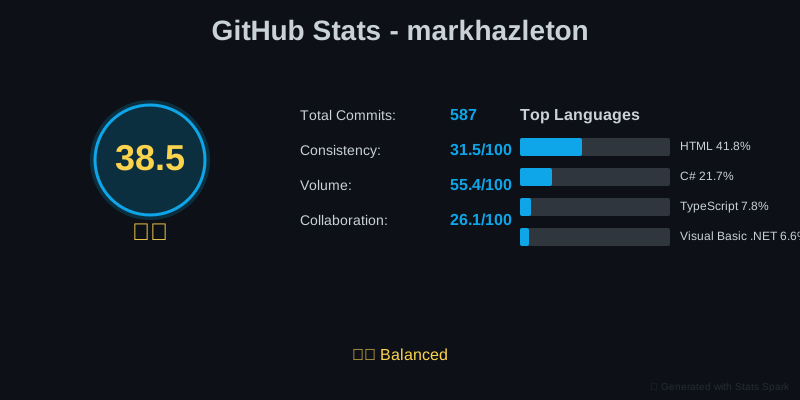
View the complete GitHub profile or explore the Stats Spark repository to see all visualizations and implementation details.
More importantly: every architectural decision, every algorithm choice, every "why we did it this way" is captured in the SpecKit artifacts. The repository documents its own creation.
The Living Documentation Payoff
Here's where it matters: if I need to extend Stats Spark in six months, or if someone else picks it up, the specs tell the whole story. Why those specific coefficient weights? It's in SPEC.md with the research citations. Why svgwrite instead of PIL for graphics? PLAN.md explains the decision criteria. What order should features be implemented? TASKS.md has the dependency graph.
That's institutional knowledge, not tribal knowledge. And it took an extra 30 minutes to update the specs after implementation—capturing what worked, what didn't, and why the final solution differs from the initial plan.
What I Learned Writing the Specs
The specs forced me to think more precisely than I usually do. For the warning cleanup, I had to define "done" upfront: zero warnings, TreatWarningsAsErrors enabled, 520 tests still passing, no pragma suppressions allowed.
Mistakes I Made
- Too vague on baseline: I said "unknown number of warnings" instead of auditing first. AI wasted time figuring out what to fix.
- Missing priority order: AI tried to fix everything simultaneously. Should have said: "Fix XML docs first, then null safety, then analyzers."
- No time estimate: Without "Target: 4 hours" I lost focus during implementation.
Here's what surprised me: these mistakes became permanent improvements to the specs. After implementation, I spent 20 minutes having AI update SPEC.md to reflect what actually worked. Future features inherit those lessons.
The Feedback Loop in Practice
Each time AI generated wrong code, I fixed it and had AI update the specs. Here's why that matters: these lessons are now permanent documentation that future developers (and AI agents) will read before making changes.
Three Implementation Lessons That Became Institutional Knowledge
Path Resolution: Spec Said One Thing, Reality Required Another
- AI generated: Absolute paths using pathPrefix config (standard Eleventy approach)
- What broke: GitHub Pages subdirectory deployment
-
I fixed it:
Custom
relativePathfilter that calculates paths dynamically - Then I closed the loop: "Update SPEC.md and PLAN.md to document why pathPrefix failed and what works instead"
- Result: SPEC.md now says "No environment-specific configuration." PLAN.md shows pathPrefix crossed out with the working alternative. Next developer won't try pathPrefix because the spec explains why it doesn't work.
Warning Suppression: Spec Was Too Vague
-
AI generated:
#pragma warning disabledirectives (fastest solution) - Spec said: "No suppressions" but didn't say HOW to fix properly
-
I fixed it:
200+ XML docs, null guards with
ArgumentNullException.ThrowIfNull() - Then I closed the loop: "Update SPEC.md with specific examples of acceptable vs. unacceptable fixes"
- Result: SPEC.md now has a "✅ DO / ❌ DON'T" section. PLAN.md has a 5-step remediation strategy. TASKS.md breaks it into auditable chunks. Future features inherit this standard.
Test Documentation: Spec Didn't Ask, AI Didn't Deliver
- AI generated: Documented library code, skipped test methods entirely
- Spec said: "520 tests passing" but not "tests need documentation"
- I fixed it: Added XML docs to 260 test methods explaining WHAT and WHY
- Then I closed the loop: "Update SPEC.md to require test documentation. Add principle to CONSTITUTION.md: 'Tests are product documentation.'"
- Result: Every future spec inherits "tests need docs" standard. AI reads the constitution before generating code. The team's quality bar persists beyond individual developers.
Why This Solves a 40-Year-Old Problem
In waterfall, specs froze at design and diverged immediately. In agile, we stopped writing specs because maintaining them was humanly impossible. GitHub Spec Kit closes the loop: when implementation teaches you something, you spend 20 minutes having AI update the specs. The path resolution lesson, the warning fix patterns, the test documentation standard—all permanent institutional knowledge that AI agents read before generating the next feature. That's what survives team turnover.
Frequently Asked Questions
The Awkward Part: Updating Specs After Implementation
The Critical Step Everyone Skips
Here's the reality: after
/speckit.implement
completes, you'll tweak edge cases, adjust UX, and fix bugs the AI missed. This iteration is expected and normal. What's different is what you do next.
THIS is Where the Value Lives
When you finally get it right, tell the agent to update SPEC.md, PLAN.md, and TASKS.md to reflect what you actually built. This 20-minute step is what traditional approaches skip—and why documentation always becomes outdated.
Example: "I fixed the GitHub Pages path resolution by implementing a custom relativePath filter. Please update SPEC.md and PLAN.md to reflect this solution instead of the original pathPrefix approach, and explain why pathPrefix failed."
Without Feedback Loop
- Specs describe what you planned, not what you built
- Future developers follow outdated documentation
- Institutional knowledge lives only in your head
- Next feature repeats the same mistakes
With Feedback Loop
- Specs evolve to match reality (living documentation)
- Future developers see what actually works
- Team learns from real-world implementation
- Each spec becomes more accurate over time
The feedback loop keeps specs synchronized with reality. Your specs document what you built and what you learned—useful for your future self and your team.
Should You Try It?
Spec Kit won't make you ship faster initially. What it does: gives you documentation that still matches reality three months later. That's worth something if you maintain long-lived codebases or work on teams where knowledge walks out the door.
Try it if:
- You maintain libraries or APIs where documentation debt is expensive
- You work on teams where "ask Bob" isn't a sustainable knowledge strategy
- You inherit codebases and wish the previous developer had explained their decisions
- You're building something that will outlive your involvement
Skip it if:
- You're prototyping and will throw away the code
- You're solo and have no knowledge transfer problem
- You're exploring and don't know what you're building yet
- You're fixing a production fire and documentation can wait
What This Project Delivered: Persistent Knowledge
- Path resolution pattern: Custom relativePath filter documented in specs—future developers won't repeat the pathPrefix mistake
- Warning remediation strategy: XML docs + ArgumentNullException.ThrowIfNull() pattern captured in PLAN.md—team inherits the standard
- Test documentation philosophy: "Tests are product documentation" principle added to CONSTITUTION.md—applies to all future features
- Specs that match reality: Documentation updated after implementation reflects what actually works, not what was initially planned
- Zero documentation debt: 20 minutes to sync specs vs. never updating them = institutional knowledge that survives team turnover
My verdict: Spec Kit solved a problem I've had for 20 years—documentation that matches reality months later. The trade-off is 20 minutes per feature updating specs after you fix what AI got wrong. If you maintain code beyond the initial sprint, that's a bargain.